Fix:
sudo apt-get -y install gtk2-engines-pixbuf
Category: Ubuntu
[deprecated] Using Oracle’s plugins in Firefox
Deprecated post: This post is left here for archival purpose. Beginning in Firefox version 52 released March 7, 2017, installed NPAPI plugins are no longer supported in Firefox.
Enable Oracle’s JRE plugin for Firefox in Linux.
- See my other post on Installing Oracle JDK 10.0.1 on Linux.
- Create your
.mozilla/pluginsdirectory if one isn’t already exists.mkdir ~/.mozilla/plugins
- Create a symbolic link of the JRE’s
libnpjp2.soshared object file in your plugins directory. In my installation, this JRE file is found in/opt/jdk-10.0.1/lib/libnpjp2.soln -s /opt/jdk-10.0.1/lib/libnpjp2.so ~/.mozilla/plugins
- Restart Firefox and browse to one of the JVM tester page to see the version of Java your browser is using.
- Java Tester —
javatester.org/version.html - Java.com —
java.com/en/download/testjava.jsp
- Java Tester —
Installing Virtubox Guest Additions in Ubuntu Guest Machines
- Install the needed packages to create kernel modules:
sudo apt-get install dkms build-essential linux-headers-generic
- Press the
Host+ Dkey combination or click on the Devices menu and choose the Install Guest Additions… option.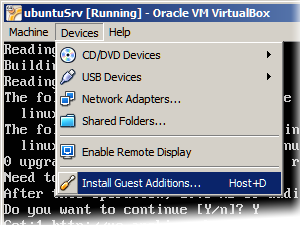
- Mount the Guest Additions iso CD image:
sudo mount -t iso9660 /dev/cdrom /media/cdrom
mount: block device /dev/sr0 is write-protected, mounting read-only - Run the installation script
sudo /media/cdrom/VBoxLinuxAdditions.run
- Restart the guest machine.
GDM Disable User List on Login Screen
Use the following command:
sudo gconftool-2 --direct --config-source xml:readwrite:/etc/gconf/gconf.xml.defaults -t bool -s /apps/gdm/simple-greeter/disable_user_list true
Setting Static IP of NAT network interface in VirtualBox
As stated in the VirtualBox user manual, section 9.10.1 Configuring the address of a NAT network interface
In NAT mode, the guest network interface is assigned to the IPv4 range 10.0.x.0/24 by default where x corresponds to the instance of the NAT interface +2. So x is 2 when there is only one NAT instance active. In that case the guest is assigned to the address 10.0.2.15, the gateway is set to 10.0.2.2 and the name server can be found at 10.0.2.3.
This means that for Ubuntu, the /etc/network/interfaces entry for the network card settings are something as below:
iface <interface> inet static
    address <static IP> (e.g. 10.0.2.7)
    netmask 255.255.255.0
    network 10.0.2.0
    broadcast 10.0.2.255
    gateway 10.0.2.2
Also, add the following nameserver entry to /etc/resolv.conf
nameserver 10.0.2.3

